

What Claude Cowork EDR Support Means for Security Operations

Claude Cowork EDR support is a beta from Anthropic that lets Team and Enterprise admins run an approved vendor's EDR sensor inside the virtual machine where Claude Cowork runs shell commands and code on a user's Mac or Windows PC. It does not reach Cowork sessions that run in Anthropic's cloud. Palo Alto Networks and SentinelOne announced integrations on November 2, 2026, and CrowdStrike followed on November 3. The beta is open now, though the vendors' own integrations are at different stages.
For a SOC lead at a company piloting Cowork, leadership's first question is often whether the security team can see what Cowork does on company laptops, and where it can't. The answer depends on where each Cowork session runs, what the sensor sends to the EDR vendor, and what an analyst needs for alert triage once an alert fires inside the VM. This post covers that endpoint view. Prompt-injection defenses, connector governance, data loss prevention and shadow AI detection are other parts of Claude Cowork security, and they are left out here.
{{ebook-cta}}
What Anthropic shipped with Claude Cowork EDR support
The beta covers Claude Desktop on macOS and Windows for Team and Enterprise plans, and Claude Desktop connected to Amazon Bedrock, Google Cloud Vertex AI or Microsoft Foundry, according to Anthropic's EDR documentation. Admins turn it on through device management, with an MDM tool on macOS or registry policy, such as Group Policy or Intune, on Windows. Each time the Cowork VM starts, Claude Desktop copies the vendor's sensor package into it and runs the vendor's install script, at most once per start. Claude Desktop installs only packages signed with an approved vendor's key, and if the setting isn't present, nothing is installed. Anthropic doesn't charge extra during the beta, though the EDR vendor may charge for the sensor.
Seven vendors are on Anthropic's approved list. As of November 3, 2026, their public status was:
- CrowdStrike. Announced Falcon Guardian AI Detection and Response (AIDR) inside Cowork on Windows and Mac on November 3. The release gives no availability date and notes that it discusses features still in development.
- SentinelOne. Announced on November 2 that "a SentinelOne agent will run inside the VM." The release is written in the future tense, and IT teams will turn the integration on through device management.
- Palo Alto Networks. Announced a Cortex XDR sensor inside the VM on November 2. Its blog post says the integration will reach private preview in the coming months.
- Evoke Security, Neo, Pluto Security and Tanium. Anthropic lists these four as approved vendors too. Ask each one whether its integration is available yet.
Microsoft Defender for Endpoint was not on the list as of November 3, 2026. Anthropic's documentation includes an application form for vendors that aren't listed, so the list can change.
What an EDR sensor inside the Cowork VM can see
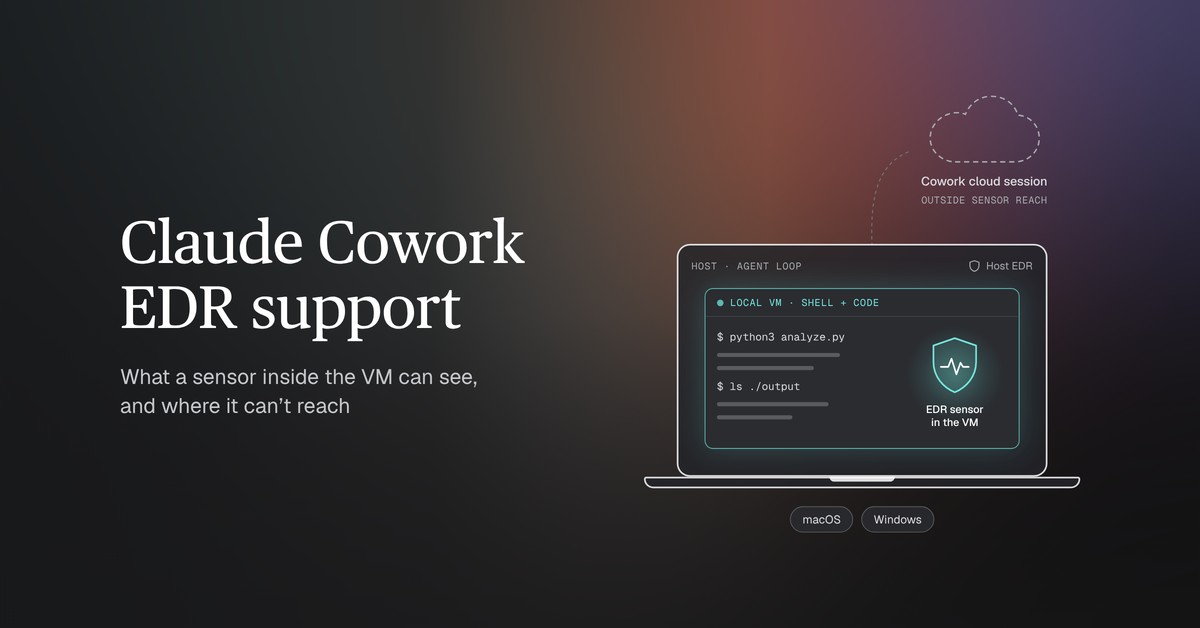
Cowork splits local work between the host and a virtual machine. The agent loop runs natively on the user's computer, including Claude's conversation handling, file reads and writes in connected folders, web fetches and local plugin MCP servers, according to Anthropic's architecture overview. Shell commands and the code Claude writes run in a dedicated Linux VM, under Apple's Virtualization framework on macOS and Hyper-V on Windows. Anthropic says the VM "is isolated from host-based security tools by design, so an EDR sensor on the host can't see inside it."
The beta adds a sensor inside that VM. Per Anthropic, it "can see activity and content inside the VM, which can include prompts, files, and Claude's responses." Each vendor describes its detection in its own terms. Palo Alto Networks says Cortex XDR will track "accessed systems, file changes and executed commands." SentinelOne describes behavioral detection, agentic tracing and alerts on agent drift, using the same Behavioral AI detection engine it runs on endpoints. CrowdStrike says Falcon Guardian AIDR identifies malicious activity and potential data exfiltration as agents run tasks. None of the three announcements says which sensor build runs in the VM, so ask each vendor which of its detections apply there before relying on one. Expect some benign alerts during a pilot, since the VM's normal work is running shell commands and code that Claude writes, and behavioral rules can fire on that. Baseline what pilot sessions normally run, and alert on deviations from that baseline.
Put together, Cowork runs work in three places, and each needs its own source of visibility:
- The host. The agent loop and its work in connected folders run here, under whatever EDR sensor the laptop already runs. Alerts from that sensor follow the usual steps to investigate EDR alerts.
- The local VM. Shell commands and code run here. The host sensor can't see them. A sensor installed through the beta runs inside the VM and can see them there.
- Anthropic's cloud. Cowork cloud sessions run here, outside both sensors. When one needs a local file or the browser, the request goes through Claude Desktop on the user's computer.
Where Cowork runs outside the sensor's reach
Cowork cloud sessions run on Anthropic's servers, in a temporary sandbox created for each session. Anthropic's architecture overview says they "run entirely outside your endpoints, so EDR tools can't observe them." How much work goes there depends on the plan and its settings. On Team plans, the "Run Cowork in the cloud" setting is on by default, and an owner can turn it off. On Enterprise plans it is off by default; an owner turns it on and grants the capability to groups through custom roles, per Anthropic's admin guide.
A second change arrives on November 16, 2026. Anthropic's unified Claude experience, which brings chat and Cowork together, turns on by default that day for existing Enterprise organizations where chat and "Cloud code execution and file creation" are both on. In Anthropic's description, every conversation starts as a chat, and when a task needs to run code or work with files, Claude continues "in an isolated cloud sandbox managed by Anthropic." Members can still link their computers so Claude can work with local folders and applications, and Anthropic's EDR documentation says Cowork running on a user's computer uses the local VM inside the unified experience too. Admins can turn the experience on early or keep it disabled. Organizations that use zero data retention, the HIPAA-ready configuration or customer-managed encryption keys can't turn it on yet. Where the unified experience turns on, Anthropic's cloud becomes the default place for code and file work, and the sensor can't reach it.
Anthropic's own records fill part of that gap. On Enterprise plans, the Claude Compliance API returns transcripts of Cowork sessions on users' machines and of Cowork sessions that run in the cloud. Its content endpoints serve Claude Enterprise data only. Chats that the unified experience moves into the cloud come back as single chats with Claude's tool calls and results inside them, and Anthropic labels that coverage beta. Team and Enterprise owners can also stream Cowork events to a SIEM through OpenTelemetry, which Anthropic says gives visibility into "tool calls, file access, human approval decisions, and more" and "doesn't replace audit logging for compliance purposes." A Team organization with cloud sessions on by default gets neither a sensor nor Compliance API content for that work. Its OpenTelemetry feed covers cloud sessions, but prompt text, Claude's responses and tool inputs are off by default in current Claude Desktop versions. Scheduled cloud tasks and sessions started on the web or in the mobile app carry metadata only.
Your EDR vendor can now receive prompts and files
An EDR sensor in Claude Cowork can see activity and content inside the VM, which can include prompts, files and Claude's responses, and it sends the data it collects to the EDR vendor; Anthropic doesn't receive or control it. The sensor can send telemetry out of the VM "outside the Cowork network allowlist," and it reports to the vendor's cloud the same way it does from the rest of the computer. Anthropic treats the sensor as third-party software that the customer runs under its own agreement with the vendor.
In practice, the EDR console may start holding source code, customer records and other material that users paste into prompts. Four decisions should come before rollout:
- Access. Which analysts, and which people at an MDR provider with console access, can read Cowork content in the EDR console.
- Retention. How long the EDR keeps that content, compared with the retention the organization set for Claude itself.
- Vendor terms. What the vendor's data processing terms say about prompt and file content.
- Review. Whether privacy or legal teams need to approve the new data flow, especially where prompts can include personal data.
How to investigate an alert raised inside the Cowork VM
An alert from inside the VM adds a question to the usual endpoint workflow. The analyst has to establish whether the user asked for the action, or whether the agent took it on its own, possibly on instructions it picked up from a file or web page. Anthropic says the risk of prompt injection in Cowork "is non-zero." A process tree shows what ran in the VM. Whether the EDR also shows the prompt behind a command depends on what the vendor's sensor records, so plan on pulling the session record as well.
The questions run in roughly this order:
- Which user and session. Match the VM alert to the user's device and the Cowork session open at that time. Compliance API session records name the user but carry no host or device metadata. Cowork's OpenTelemetry events add the operating-system login in
process.ownerand asession.id, andprompt.idlinks every event that one prompt produced. - What the user asked. On Enterprise, the session transcript from the Compliance API shows the request in the user's own words, though it doesn't return local sessions under zero data retention. Without a transcript, the OpenTelemetry
user_promptevent from current versions of Claude Desktop carries the prompt text only when theotlpContentCapturedevice setting includes it. - What the agent read first. Injected instructions would arrive in content that entered the session before the action, such as files, web pages or connector results. On Enterprise, the Compliance API transcript includes the text of tool results, returned up to 10,000 bytes each unless the request raises
tool_result_max_bytes. The three-step sequence in our shadow AI guide applies to Cowork sessions too. - What the agent ran and touched. VM telemetry from the beta sensor, plus host telemetry for reads and writes in connected folders where the host sensor records file activity. Web fetches and local plugin MCP servers run outside the VM, and Cowork's network egress permissions don't apply to them. Check OpenTelemetry
tool_resultevents and the session transcript for what the agent did through them. Local plugin MCP servers run on the host, so look for their processes in host EDR telemetry as well. - Whether anyone approved it. OpenTelemetry
tool_decisionevents record each tool permission decision, and theirsourcefield shows whether a user, a hook or configuration made it. New Cowork tasks start in "Automatically approve" mode by default on Team plans and not on Enterprise plans, so a Team session may have no approval to find. Unless an owner has turned the mode off, members on either plan can switch to it within a session. - Whether it happened elsewhere. The same command, file or destination in other users' sessions can point to a shared source, such as a poisoned document or plugin. A plugin the organization installs for every member can also produce the same commands across many sessions legitimately, so compare a match with what that plugin normally does.
Anthropic says the VM runs until Claude quits or the user signs out, so collect any live evidence from the VM before either happens. Files the session wrote to connected folders, and anything saved to a Cowork project's memory, stay on the computer for later sessions, so review both before the user resumes work. Check the user's scheduled tasks as well, since Claude can set one up from a request. Where cloud sessions are on, a task that doesn't need local files or apps can keep running remotely while the computer is asleep. Teams that monitor AI agents this way should keep the session record and the EDR data for comparable periods, or an investigation months later may find one source already deleted. Identity logs add the user's sign-ins around the time of the alert, which can show whether the account also signed in from another device or location. Alerts from the VM usually land in the same queue as the team's other endpoint investigations, and they often take more sources to close.
What to check before turning on Claude Cowork EDR support
Before the beta goes on, the security team should be able to answer each of these:
- Vendor status. Whether your EDR vendor is on Anthropic's list, and whether its integration is available to you now, in preview or only announced.
- Prerequisites. Claude Desktop 4.4212.0 or later. On Windows, the
.msixbuild on Windows 10 or 11, with hardware virtualization and the Virtual Machine Platform feature turned on. - Where sessions run. Which groups can run Cowork in the cloud, and whether the unified experience turns on for your Enterprise organization on November 16.
- Session records. On Enterprise, whether the Compliance API is enabled with an access key the SOC can use, since local sessions are captured only while it is enabled and users are signed in with their Claude Enterprise account. On Team and Enterprise, whether OpenTelemetry events reach the SIEM, and whether the
otlpContentCapturedevice policy is set, since without it current Claude Desktop versions send metadata only. Where chat and Cowork are unified, chats that Claude moves into the cloud carry metadata only either way. - Data handling. The access, retention, vendor-terms and review decisions above.
- Testing. Anthropic makes the customer responsible for testing the sensor before deployment and again after any update to Claude or to the EDR software. A basic check is to have Cowork run a harmless command in a pilot session and confirm the event reaches the EDR console.
- Package lifecycle. Signatures expire within two years, so plan to deploy a re-signed package from the vendor. The signature covers the package file, not updates the sensor downloads later.
- Removal. Removing the setting stops Claude from running the package at later VM starts, but it doesn't remove a sensor that's already installed.
- Cost. What the vendor charges for the sensor.
What Claude Cowork EDR support means for security operations
With Claude Cowork EDR support, a SOC can put its own sensor inside the VM where Cowork runs code on company laptops. The sensor covers that VM only. The host keeps its existing sensor, and visibility into Cowork cloud sessions comes from the Compliance API on Enterprise plans or from OpenTelemetry. Before turning the beta on, the team should know where each group's Cowork work runs, decide who can read the prompts and files that will reach the EDR console, and plan for alerts that need the session record as well as the process tree to close.
Prophet AI uses AI SOC agents to investigate every alert across the tools a team already runs, EDR alerts included, and shows each query and piece of evidence behind its determination. See how the Prophet AI SOC Analyst works on your own alerts.

Insights
The Roles Your AI-Enabled SOC Will Need
Gartner research on how SOC roles shift as AI SOC agents reduce alert-handling work

As the Director of Product Marketing at Prophet Security, Ajmal drives marketing and growth strategies and helps security professionals see how AI is transforming security operations.