


Confluence Vulnerability CVE-2026-90436: How to Check Data Center for Exploitation

Within about twelve hours of exploiting CVE-2026-90436, a critical Confluence vulnerability, an attacker had moved from a Confluence Data Center server to a Microsoft 365 account. On the way, they read the Confluence database using the application's own credentials, searched file attachments for credentials and payment card numbers, and queried a production cloud data warehouse. Rapid7 detected the intrusion on November 13, reported it on November 16 and published the details on November 17.
CVE-2026-90436 is a flaw in Apache Axis 1.x, a library Confluence uses for its Remote API (XML-RPC & SOAP). On an affected version with that API enabled, an attacker who can reach the server can run commands on it as the Confluence operating system account, with no login required.
Leadership will ask whether any of your Confluence instances are exposed and whether anyone got in before you checked. The first can be answered in minutes, because exposure depends on one setting and the version number. The second takes a threat hunt across web logs, the Confluence host and the systems that Confluence's stored credentials can reach.
{{ebook-cta}}
What We Know About the CVE-2026-90436 Confluence Vulnerability
Apache disclosed CVE-2026-90436 on November 6. When an inbound SOAP fault names a class in its exceptionName element, Axis 1.x loads that class and can call its constructor before checking that it is an AxisFault. Apache marked the report unsupported when assigned, since Axis 1.x is end of life, and does not expect to release a fixed Axis 1.x version.
Atlassian's advisory followed on November 9 and rates the Confluence vulnerability critical, with a score of 9.3 under CVSS 4.0. It lists Confluence Data Center versions 1.x through 9.x as affected and 9.2.28 as the fixed release. Confluence 10.x is not affected, because Atlassian removed the Remote API in Confluence 10.0, and Confluence Cloud is not affected either.
Atlassian's issue tracker lists 9.3, 9.4 and 9.5 releases among the affected versions, with 9.2.28 as the only fix version. For instances on those lines, the forward upgrade is 10.x. Teams that patched CVE-2026-21589, a separate flaw that also affects Confluence Data Center, may have moved to 9.2.26 or 9.2.27, and both are still affected by CVE-2026-90436.
N-able N-central is the other product reported exploited through the same flaw. N-able published indicators of compromise on November 13 without naming a CVE, and Rapid7 says the exploitation N-able reported strongly correlates with CVE-2026-90436. N-central is exposed when its Legacy API is on, which N-able says is off by default, and the 2026.4 HF3 release disables it.
Other software that bundles Axis 1.x may carry the same flaw. Rapid7 says CVE-2026-90436 is now being actively exploited against both Confluence and N-central, and a public proof-of-concept lab reproduces the trigger on a stock Axis install. As of November 17, CISA had not added the CVE to its Known Exploited Vulnerabilities catalog.
Which Confluence Data Center Instances Are Exposed?
An instance is exposed to the Confluence vulnerability when it runs an affected version and its Remote API (XML-RPC & SOAP) setting is on. Atlassian says the setting has been off by default for new installations since Confluence 3.0. The advisory does not say whether an upgraded instance keeps an older setting, so check every instance instead of assuming the default.
An administrator can read the setting under General Configuration, then Further Configuration, which is also at /admin/viewspacesconfig.action under the base URL. From a browser, Atlassian's check is to request /plugins/servlet/soap-axis1/confluenceservice-v2. An HTTP 403 response means the API is off, and a page that mentions confluenceservice-v2 or an AXIS service means it is still on.
A reverse proxy or WAF that blocks that path can also return a 403, so confirm the setting in the admin page as well. Rapid7 recommends starting with internet-facing instances that have the API enabled and checking internal deployments too, since an attacker with a foothold inside the network may be able to reach them.
Turning the setting off takes effect without a restart, but Atlassian warns that it can break scripts, automations and third-party apps that use the API.
Access logs can show who those callers are. Pull the addresses and user agents that requested the XML-RPC endpoint, /rpc/xmlrpc, or any path containing soap-axis, going back as far as your logs keep. Then confirm each caller with its owner before the change.
If an integration still needs the API, 9.2.28 is the fixed release that keeps it. For instances already on 9.3 to 9.5, that would mean a downgrade, which Atlassian does not support. Confluence 10.x drops the API, so an upgrade to 10.x means moving that integration to the REST API first. Atlassian deprecated the XML-RPC and SOAP APIs in Confluence 5.5 and recommends its REST API instead.
On any affected version, turning the Remote API off removes the exposure until you can upgrade. The upgrade path depends on the version:
- 10.x and Confluence Cloud. Not affected. Atlassian removed the Remote API in Confluence 10.0, and Cloud sites need no action.
- 9.3 to 9.5. Affected, with no fixed release on these lines. Upgrade to 10.x, first moving any integration that still uses the Remote API to the REST API.
- 9.2.28. Fixed. If the API was on before the upgrade, still hunt for signs of earlier exploitation.
- 9.2.0 to 9.2.27. Affected. Upgrade to 9.2.28, which keeps the Remote API, or to 10.x.
- 9.1 and earlier. Affected. Atlassian's issue tracker lists affected versions as far back as 2.0.0. Upgrade to 9.2.28 or 10.x.
How the Confluence Vulnerability Is Exploited
The attack is an HTTP POST to a SOAP endpoint that carries a crafted SOAP fault. Axis reads the fault's detail element while it works out which service the request is for, before any per-service handler runs. Authentication configured on a service therefore does not stop it, and the public lab shows the same request working against a service name that does not exist.
What the attacker can do next depends on the classes the application ships. On a stock Axis 1.4 install, the lab demonstrates loading an attacker-named class and creating or truncating a file, and names a stock class that can trigger a DNS lookup. Its authors found no class on that stock classpath that leads to command execution.
Turning the Axis flaw into a Confluence RCE takes a suitable class from the application itself. Atlassian describes the impact in Confluence as commands running as the Confluence operating system account.
Evidence of an attack can turn up in three places: the web logs that record the request, the host where commands run, and the systems an attacker can reach with credentials Confluence stores.
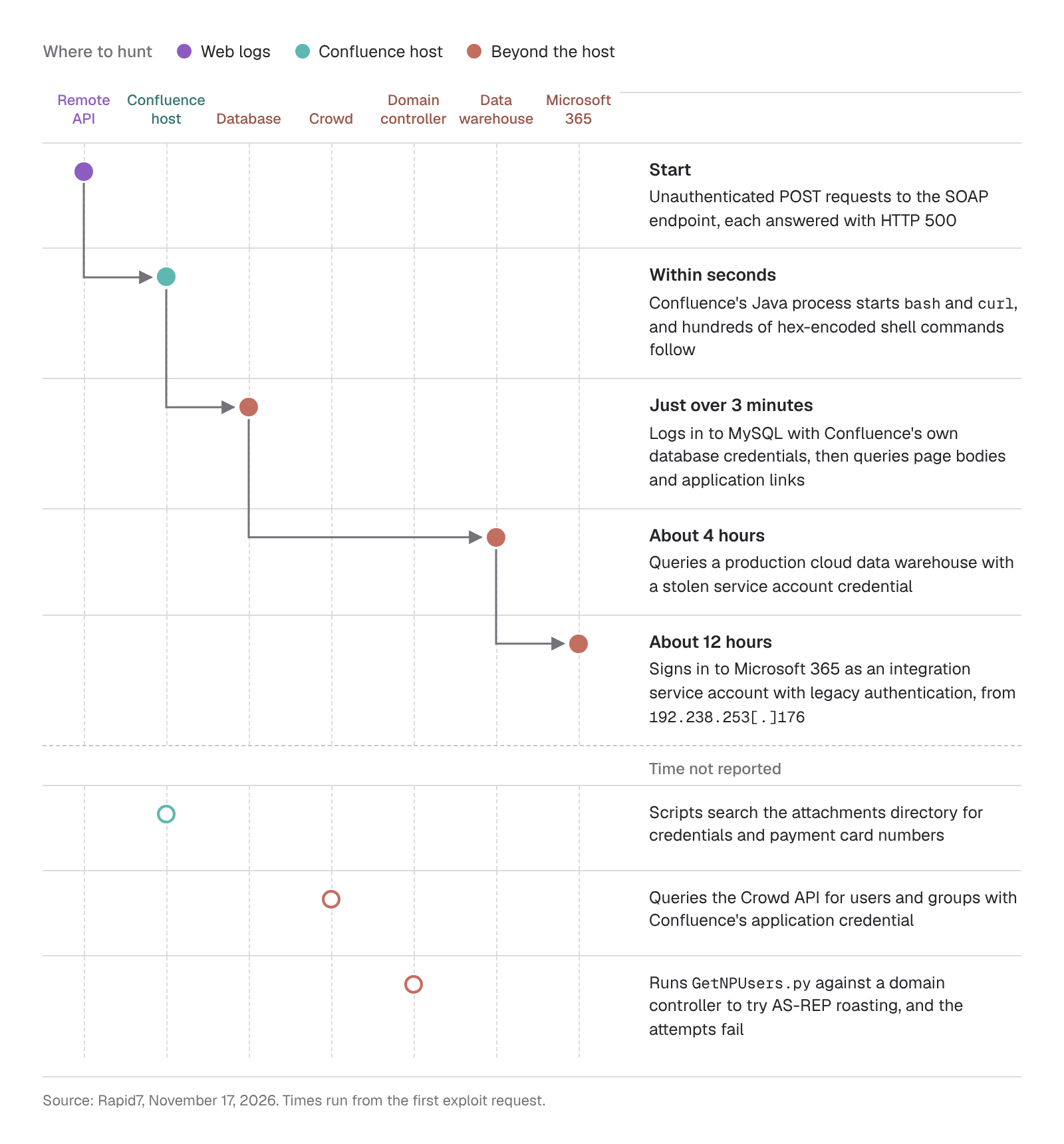
How the attacker in the Rapid7 case moved from Confluence's Remote API to Microsoft 365 in about twelve hours.
Hunting for CVE-2026-90436 Exploitation in Web Logs
As with the SharePoint zero-day and the Citrix NetScaler zero-day, an upgrade closes the Confluence vulnerability but does not show whether anyone got in before it. Start the hunt with Confluence's Tomcat access logs and the logs of any reverse proxy, load balancer or WAF in front of it. If Confluence's own access logging was off, or its default 30-day retention has already deleted the days you need, the proxy's logs may be the only record of the requests. Behind a reverse proxy or an HTTP load balancer, Tomcat may log the proxy's address instead of the client's, so take client addresses from the proxy's logs unless Tomcat records X-Forwarded-For.
Search for POST requests whose path contains soap-axis anywhere, which covers more than the exact path in Atlassian's advisory. Match on the decoded path where your tools allow, since URL encoding can hide a literal match. In the Rapid7 case, the attacks targeted /plugins/servlet/soap-axis1/confluenceservice-v2.
Atlassian's developer documentation for the deprecated SOAP API places the service's WSDL at /rpc/soap-axis/confluenceservice-v2?wsdl. On a stock Axis install, the lab also triggers the flaw through service names that do not exist.
Then prioritize requests answered with HTTP 500. Every malicious POST in that intrusion returned a 500, and the lab's attempts return the same status with a generic fault such as soapenv:Server.userException. Legitimate integrations can trigger server faults too, so compare each hit's source address and user agent against the integrations known to call the API. For a hit you cannot explain, check the host for processes the Confluence Java process started in the minutes after it, since the 500 does not show whether the attempt worked.
Rapid7 lists four IP addresses tied to the Confluence intrusion. Search web, proxy, firewall and identity logs for all four, since the attacker also used one of them, 192.238.253[.]176, to sign in to Microsoft 365:
192.238.253[.]1765.133.47[.]243163.182.68[.]109104.13.106[.]166
An attacker can switch infrastructure between targets, so a miss on these addresses does not clear an instance. Search from November 6, when Apache published the flaw, and earlier if your log retention allows, since exploitation can begin before a public disclosure. Export identity sign-in logs before they age out: Microsoft Entra ID keeps them for 30 days with a P1 or P2 license and seven days without one, unless they stream to a SIEM or storage account.
On an instance where the API is already off, Atlassian's check returns HTTP 403 on the SOAP path. Repeated 403s there from addresses you do not recognize can point to probing, though your own vulnerability scanners can produce the same pattern.
Hunting on the Confluence Host
On the server, or on every node of a Confluence cluster, look for the Confluence Java process starting a shell or a download tool. In the Rapid7 case, it launched bash and curl as the Confluence service account within seconds of the SOAP requests.
Processes to search for include sh, bash, curl and wget on Linux, and cmd.exe and powershell.exe on Windows. Confluence starts some processes for legitimate reasons, such as Synchrony, the collaborative editing service it can launch as a separate Java process. Baseline what the Java process normally starts on your hosts and investigate anything outside that baseline. On Windows, a Confluence service usually runs Java inside the Tomcat service executable, such as tomcat9.exe, so match that parent as well as java.exe.
The attacker also ran hundreds of hex-encoded shell commands and fetched scripts from temporary Cloudflare Tunnel and Pinggy domains. Investigate long hex strings in command lines, and connections from the Confluence host to the domains in Rapid7's indicators:
*.trycloudflare[.]comwpefh-192-238-253-176.free.pinggy[.]netwebhook[.]site
Cloudflare Tunnel, Pinggy and webhook.site are legitimate services that developers also use, so treat a connection to one of them as a lead to investigate. If the exploit uses Spring's ClassPathXmlApplicationContext, the example the lab's authors give, the Java process downloads an XML file named in the request, and that file can run code without starting a new process. Investigate any connection from the Java process to an address it does not normally contact, especially within seconds of a SOAP request.
The lab also lists a class on the stock Axis classpath that would make the server resolve a DNS name, which an attacker can use as a probe. If the server looks up a domain the attacker controls, the attacker knows the instance is vulnerable without having run a command. To catch that probing, search DNS logs for lookups from the Confluence host to domains it has not resolved before. Some macros make Confluence fetch data from remote servers, so a new domain can also come from a macro a user just added to a page.
Command execution as the Confluence account also lets an attacker change any file that account can write. On Windows, a Confluence service set up by the installer runs as SYSTEM unless an administrator changed the account, which gives an attacker control of the whole host. Compare the installation directory against a clean copy of the same version, and review recent changes in the home directory. Confluence routinely writes attachments, search indexes and logs there, so look for new files such as scripts and executables. Work through anything new with the method in our guide to web shell detection.
Check Confluence's audit log as well, for new administrators and permission changes since November 6. If the host runs an EDR agent, its process, file and network telemetry covers most of these checks, the same data used in an EDR alert investigation. Without one, the process checks rely on process creation logging set up before the attack, such as auditd rules for execve on Linux or Sysmon on Windows.
Hunting Beyond the Confluence Host
The Rapid7 case shows how far an attacker can get with the credentials and keys Confluence stores. The attacker enumerated Confluence's configuration, encryption keys and database settings, then logged in to MySQL with Confluence's database credentials about three minutes after the first command.
Confluence keeps its database connection details, including the password, in confluence.cfg.xml in its home directory, or in Tomcat's server.xml when it uses a datasource connection. Confluence 9.1 and later encrypt the password by default, but treat it as exposed on any host where an attacker ran commands, since this attacker went after the keys along with the settings. The same applies where Confluence fetches the password from a secret store such as AWS Secrets Manager, because code running as Confluence can make the same request.
Hunt for the steps that followed in the intrusion Rapid7 described:
- Database access. Look for a database client such as
mysqlorpsqlstarted on the Confluence host and, if your database logs queries, for sessions under Confluence's database account that read page bodies, application links or attachments in bulk. Also look for queries that search page bodies, application links or attachments for names associated with credentials, tokens, VPN configurations or private keys, which is what this attacker ran. A site reindex reads page content in bulk too, so check whether one was running before treating a bulk read as suspicious. Confluence normally reaches its database from its own Java process, so a command-line client running as its service account needs an explanation. If your database or network logs record connections, also investigate logins with Confluence's database account from hosts other than the Confluence nodes and any standalone Synchrony nodes, which use the same account. - Attachments. If your telemetry records file reads, look for bulk reads of the attachments directory. Confluence itself and backup jobs read it routinely, so look hardest at reads by shells and scripts running as the Confluence account, even when they touch only a few files. The attacker's scripts searched
/var/atlassian/application-data/confluence/attachments/v4/, the default location in that environment, for credentials and card numbers. Data Center can also keep attachments in Amazon S3. There, look for bulk downloads from the bucket in its server access logs or CloudTrail data events, if you collect them. Then check for outbound transfers from the host, using the methods in our guide to data exfiltration detection. - Domain controllers. The attacker ran Impacket's
GetNPUsers.pyagainst a domain controller to try AS-REP roasting, which failed in that case. In domain controller security logs, the same source used for Kerberoasting detection, look for ticket requests from the Confluence server (event4768) with a pre-authentication type (PreAuthType) of0, which a successful AS-REP roast produces. An attempt that finds no account with pre-authentication disabled gets no ticket and leaves no such event. Where domain controllers audit Kerberos authentication failures, which is off by default, the attempt can still leave4768failure events, such as result code0x6for user names that do not exist. To catch failed attempts too, look for Kerberos or LDAP connections from the Confluence host by processes that do not normally make them, such as a Python interpreter. Confluence servers that use Kerberos single sign-on or an Active Directory user directory talk to domain controllers routinely, so compare against that baseline. Reset the password of any account a hit names, since the attacker can try to crack that response offline, and turn on pre-authentication for it unless an application needs it off. - Crowd and application links. The attacker queried the Atlassian Crowd API with Confluence's application credential and read the application links stored in Confluence's database. Review Crowd's logs for that credential's activity, and treat the credentials behind each application link as exposed. Crowd's audit log does not record application access, so check Crowd's access log, if enabled, for requests outside Confluence's own login checks and directory sync, which runs every 60 minutes by default. On the Confluence host, look for connections to the Crowd server from any process other than Confluence's Java process.
- Service accounts. About four hours in, the attacker used a stolen service account credential to query a production cloud data warehouse. About twelve hours in, they signed in to Microsoft 365 as an integration service account using legacy authentication. Review sign-ins by service and integration accounts from new addresses, and filter Microsoft Entra ID sign-in logs, both interactive and non-interactive, by client app to find legacy authentication. For a sign-in you cannot explain, review what the account did next in that service's audit log or query history.
Containment and Recovery After a Confluence Compromise
Rapid7 recommends remediating exposed systems as an emergency, outside normal patch cycles. On a host with a confirmed hit, preserve evidence first: record running processes and network connections, capture memory, take a snapshot and copy the logs before an upgrade replaces files on disk. An implant loaded into the Java process can leave no file behind, and restarting Confluence erases it. Then isolate the host, upgrade to 9.2.28 or a 10.x release, and turn off the Remote API on any instance that cannot be upgraded right away.
As soon as the host is isolated, rotate the secrets the Confluence account could read, without waiting for the upgrade, since several of them can be used from other systems. On a Windows host where Confluence ran as SYSTEM, they also include service account passwords stored as LSA secrets and, often, the credentials of users who have signed in to it. On any host, they include:
- the Confluence database password, any encryption keys stored on the host, and credentials for any cloud role attached to the host, which a process on it can usually request from the instance metadata service (in AWS, revoke the role's active sessions)
- Confluence's application credential in Crowd, or the bind account for an LDAP user directory, and the passwords of users in Confluence's internal directory, whose hashes are stored in its database
- the credentials behind each application link, and the outgoing mail server account
- integration and service account credentials, especially any that reach a cloud data warehouse or Microsoft 365, revoking their sessions as well, since a password reset does not end every session and an access token already issued can stay valid until it expires
- passwords, keys, tokens and VPN configurations stored in pages and attachments, which the attacker in the Rapid7 case searched for; running the same searches on your own instance helps find the ones to rotate
Before the host goes back into service, check for persistence, such as new Confluence administrators and personal access tokens, apps nobody on the team installed, and new scheduled tasks, cron entries or SSH keys for the service account. Upgrading in place can leave persistence these checks miss, so where you can, rebuild the host from a clean image and reattach the home directory and database only after reviewing them. Then watch the rotated accounts for sign-ins and failed attempts from addresses you do not recognize, which show whether the rotation held.
If every check comes back clean, two changes still lower the risk. Moving to Confluence 10.x removes the Remote API entirely, so no setting is left to switch back on. For other software built on Axis 1.x, Apache recommends moving to another SOAP engine, such as Axis 2.
How Prophet AI Hunts for Emerging Threats
The intrusion Rapid7 described left evidence in web, endpoint, database, directory and identity logs within about twelve hours, and Rapid7 assessed the attacker's scripts as likely AI-generated. Checking whether the same thing happened to you means searching each of those sources and connecting the results. With AI threat hunting, agents run that search across the sources a team has connected.
Prophet AI Threat Researcher, an agent inside Prophet AI Threat Hunter, tracks emerging threats against a profile of your organization, including the software you run. For a critical CVE or campaign relevant to your environment, it researches the tradecraft and builds a hunt, ready to run or schedule. For severe emerging threats, those hunts run automatically in the background, with as much approval before they run as your team chooses.
Leads from a hunt go to Prophet AI SOC Analyst for a full investigation, with every query and piece of evidence recorded. When it confirms a threat, Prophet AI Threat Hunter scopes related activity across your connected sources, showing when the attack started as well as how far it reached. Validated findings can then become detections through Prophet AI Detection Engineer, backtested against your own history.
If a retrospective Confluence hunt is on your list, see how Prophet AI Threat Hunter runs hunts for emerging threats.
CVE-2026-90436 is a critical Confluence vulnerability in Apache Axis 1.x, a library Confluence uses for its Remote API (XML-RPC & SOAP). On an affected version with that API enabled, an unauthenticated attacker can run commands on Confluence Data Center as the Confluence operating system account. Atlassian lists 9.2.28 as the fixed release. Rapid7 reported exploitation on November 16, 2026, and ties exploitation of N-able N-central to the same flaw.
No. Atlassian says CVE-2026-90436 has no impact on Atlassian Cloud sites, so Confluence Cloud customers need to take no action. The flaw affects self-managed Confluence Data Center on affected versions from 1.x through 9.x when the Remote API (XML-RPC & SOAP) is enabled. Confluence 10.x is not affected either, because Atlassian removed the Remote API in Confluence 10.0.
An administrator can open General Configuration, then Further Configuration, and look at the Remote API (XML-RPC & SOAP) setting. From a browser, request /plugins/servlet/soap-axis1/confluenceservice-v2 on the instance. Atlassian says an HTTP 403 response means the API is off, while a page that mentions confluenceservice-v2 or an AXIS service means it is still on. A proxy or WAF that blocks the path also returns 403, so confirm the setting in the admin page too.
Apache does not expect to release a fixed Axis 1.x version. It marked CVE-2026-90436 unsupported when assigned because Axis 1.x is end of life, and recommends moving to another SOAP engine such as Axis 2. A patch commit exists for teams that build Axis themselves. Products that bundle Axis 1.x depend on their vendor's update, such as Confluence 9.2.28 or N-central 2026.4 HF3.
Atlassian lists Confluence Data Center 9.2.28 as the fixed release, and Confluence 10.x is not affected because the Remote API was removed in 10.0. Atlassian's issue tracker lists 9.3, 9.4 and 9.5 releases as affected with no fix on those lines, so the forward upgrade for them is 10.x. Until an instance can be upgraded, turning off the Remote API (XML-RPC & SOAP) removes the exposure.
They are separate critical flaws that both affect Confluence Data Center. CVE-2026-21589, disclosed in October, lets an unauthenticated attacker access specific files in eight Atlassian products, and CISA added it to the Known Exploited Vulnerabilities catalog on October 15. CVE-2026-90436 allows command execution through Apache Axis and needs the Remote API enabled. Confluence 9.2.26 fixes CVE-2026-21589 but is still affected by CVE-2026-90436, which 9.2.28 fixes.

Insights
Definitive Guide to Detection Engineering
Where detection engineering falls short, how to close those gaps, and what it looks like in an AI-enabled SOC.


As the Director of Product Marketing at Prophet Security, Ajmal drives marketing and growth strategies and helps security professionals see how AI is transforming security operations.