


ARTEX AI Attacks: How to Check Identity, Cloud and Web Logs

ARTEX is a penetration-testing tool, first released free on GitHub, that uses large language models to run a team of AI agents from scouting a target through stealing its data, with little human help. On November 5, Microsoft reported a case in which an AI agent took five minutes to get from scanning GitHub for leaked secrets to pulling data out of an Azure Key Vault. Microsoft flags that activity as suspected ARTEX use.
Still, in the intrusions Microsoft and Google have described, ARTEX agents relied on familiar techniques, such as leaked application credentials, password spraying and web application exploits, that leave records in identity, cloud and web server logs when that logging is turned on. A team can check its own exposure with a directed threat hunt for each of those paths.
Prophet AI Threat Researcher compiled a threat report on Storm-0940 after Microsoft tied the group to ARTEX. Prophet AI Threat Hunter can run that report as a hunt in a team’s own environment.
Since late August 2026, espionage groups and financially motivated criminals have used ARTEX AI in real intrusions. After reports like these, leadership usually asks whether the organization was already affected, and how fast the team can tell.
Public reports describe three main ways ARTEX operators tried to get in, and the checks below cover each one, along with what the agents did once inside. Running ARTEX for authorized tests is out of scope, and full indicator lists stay in the linked vendor reports.
{{ebook-cta}}
What ARTEX AI is and who is using it
Google Threat Intelligence describes ARTEX AI as a multi-agent penetration-testing and command-and-control platform written in Go, with a Next.js web console. Google counts six specialized sub-agents across the attack lifecycle and traces the original code to a GitHub developer known as Autumn-27. Microsoft notes that ARTEX can use any AI model.
In practice, Chinese models led by DeepSeek were the most common choice in the ten exposed instances Check Point analyzed. The creator took the original repository down in October 2026 after widespread abuse, but forks remain public, including ScopeWeaver and a commercial version called ARTEX PRO.
Check Point describes ARTEX as built to help security teams assess systems they own or are authorized to test. Criminal and state-aligned groups have also turned the ARTEX hacking tool on systems they had no permission to test. Reports published from October 7 to November 6, 2026, include these campaigns, which range from China-state-aligned espionage to financially motivated crime:
As of November 5, SOCRadar noted that no vendor had published evidence linking the four operator clusters it listed, including Storm-0940 and Vapor Panda, to one another beyond their shared use of the tool. ARTEX is also one of several agentic offensive frameworks Google has seen abused in incident response engagements, alongside Hexstrike, Cairn and PentAGI. Google found that most of the PentAGI activity it observed stayed at asset mapping and vulnerability scanning.
How the documented ARTEX attacks looked in logs
Microsoft found multiple Storm-0940 intrusions in which less than three hours passed between initial targeting and privileged access. In the intrusions Google investigated, ARTEX ran in compressed bursts of roughly 2 to 25 seconds, with extended pauses during operational phases. Google counted 27 events in 23 seconds of activity in one burst. Microsoft saw failed Azure API calls followed by retries with a changed API version or HTTP method. In its published examples, the corrected request came about 28, 60 and 80 seconds after the failure. By default, ARTEX uses common tools, such as Nmap, curl, wget, Python HTTP clients, Norma SDK WebFetch and headless Chromium through Playwright. In Storm-0940’s traffic, Microsoft listed user agents such as Python-urllib/3.12, python-requests/2.31.0, python-requests/2.34.2, curl/7.88.1 and azure-toolkit/1.0.
Google’s cases also left tool artifacts, such as files named artex-probe-*, EC2 calls made with the DryRun flag and placeholder IDs, dry-run sweeps of Azure deployments and callbacks to webhook.site. The checks below cover each one.
A hunter can use these patterns to narrow a search for agentic AI attacks, but scripts and deployment pipelines also burst and retry. Microsoft also warns that threat actors can and do change source IP addresses, user agent strings and other fingerprints. So hunt the behavior, and compare each identity with its own history. An earlier Prophet Security post on the speed of AI-driven attacks made the same case: the techniques are familiar, and they now run faster.
The diagram below maps each entry path in the documented ARTEX attacks to the foothold or attempt it produced and the logs where it shows.
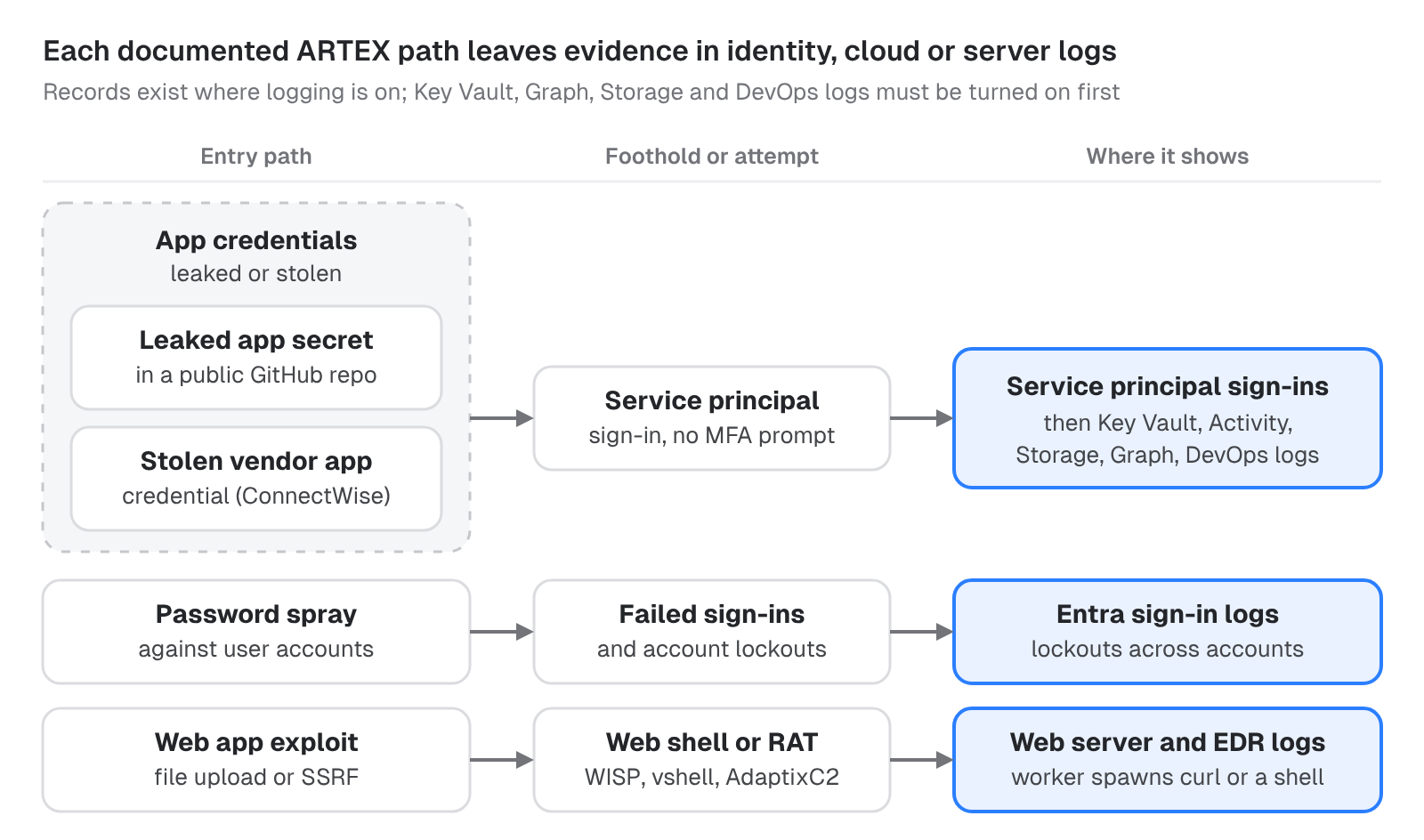
Read each row from left to right, then start with the rows that match your exposure: apps that sign in with client secrets, user accounts that accept passwords and web applications that face the internet.
How to check Entra ID for leaked app credentials and password spraying
The app credentials and password spray rows both run through Entra ID. Start with app credentials, because the path in two of Microsoft’s three reports ends in a service principal sign-in, and app sign-ins raise no MFA prompt, as Todyl points out. In Log Analytics and Microsoft Sentinel, AADServicePrincipalSignInLogs records those sign-ins, with the credential type in ClientCredentialType. In Defender XDR, EntraIdSpnSignInEvents holds service principal sign-ins, keeps the error code in ErrorCode and needs Entra ID P2. User sign-ins sit in SigninLogs and AADNonInteractiveUserSignInLogs (EntraIdSignInEvents in Defender XDR, which also needs Entra ID P2), and changes to apps sit in the Entra audit log, AuditLogs. These Log Analytics tables fill only for the log categories an Entra diagnostic setting streams to the workspace, so check that the service principal and non-interactive categories are on. Microsoft Sentinel needs Entra ID P1 or P2 to ingest sign-in logs, though any Entra ID license is enough for AuditLogs.
- Published addresses. Search the user and service principal sign-in tables for every published address, as far back as retention allows and at least from October 1, and include failures. Defender XDR’s own advanced hunting data and the Entra admin center go back 30 days at most. For earlier dates, search wherever your sign-ins were exported, such as a Log Analytics workspace, a storage account or another SIEM. Expect few or no hits.
199.19.77.18is a Tor exit node, so a hit on it may come from unrelated traffic. For a hit inAADServicePrincipalSignInLogs,ServicePrincipalCredentialKeyIdidentifies the credential that signed in. Search for every sign-in with that key ID, from any address, and trace where that credential was stored and who could read it. - Password spray. In
SigninLogs, look for one address, or a small set of addresses, failing against many accounts with wrong-password errors (50126), lockouts (50053) or both, then any success from those addresses. Count a sign-in that accepted the password but did not pass MFA as a hit too, since the attacker has a working password, and reset that password. In Storm-0940’s October 10 to 14 spray, lockouts made up nearly 98% of the activity, which peaked at 2,900 failures a minute, and Microsoft observed no successful sign-in in that phase. A spray from rotating addresses that tries each account about once a day can slip past per-address and per-account counts, so also group failures by internet provider. Entra ID Protection’s “Password spray” detection, which needs Entra ID P2, fires only when a sprayed password is validated, so failed attempts alone do not trigger it. The usual benign match is shared egress, such as an office network, proxy or VPN, where many users’ routine failed sign-ins appear from one address. Check who owns the address and compare it with its own failure history. In overlapping activity against software vendors, Wiz saw the same tooling spray Okta as well as Entra ID, so run the same check on every identity provider you use. On Amazon Cognito, Wiz saw account recovery and sign-up abuse instead, in calls such asInitiateAuth,ForgotPassword,ResendConfirmationCodeandSignUp. Our guide to password attacks on user accounts covers the investigation. - Secret failure, then success. Look for
AADSTS7000215(an invalid client secret) orAADSTS7000222(an expired one), logged as7000215and7000222, in service principal sign-ins, followed by a success from the same address. Misconfigured apps and stale secrets after a rotation fail too, usually from the app’s normal hosts. Microsoft calls a failure followed by a success urgent, and the case is strongest when the address is one the app has never used. A stolen secret that still works needs no failed attempt first, so also review each app’s successful sign-ins from addresses it has never used. Apps that run on shared infrastructure with dynamically assigned addresses, such as GitHub-hosted runners, sign in from new addresses routinely, so for them a new address carries less weight. - One address, many service principals. Look for three or more service principals signing in from one address, with mixed success, the threshold Microsoft gives. Shared egress, such as a NAT gateway or a pool of CI runners, can do the same, so check who owns the address. Defender XDR has a detection for this pattern, “Multiple Service Principal Sign-ins from Single IP”.
- One app, many resources, fast. Use
ResourceDisplayNameto find one app requesting tokens for Azure Resource Manager (listed in Entra asWindows Azure Service Management API), Key Vault, Storage and Microsoft Graph within a short window. Deployment pipelines do this routinely, so compare the app with its own history and the addresses it normally signs in from. - App credential and role changes. In
AuditLogs, look for a new secret, certificate or federated credential added to an app, or an app assigning itself a role, followed by a sign-in from an address the app has never used. Filter on audit operations such asAdd service principal credentials,Add member to roleandAdd app role assignment to service principal, and on operation names containingCertificates and secrets management. In Storm-0940’s intrusions, one ConnectWise app assigned itself the Global Administrator role. To do that, an app already needs a high-privilege permission such asRoleManagement.ReadWrite.Directory, orAppRoleAssignment.ReadWrite.All, which lets an app grant itself more, so list the apps that hold either. App owners rotate secrets and admins grant roles as routine work, so check who made each change. Microsoft names detections for both patterns: “Suspicious service principal sign-in following credential addition” and “Application self-assigned Global Administrator role”. - Vendor apps. If you use ConnectWise Cloud Backup, search
SigninLogs,AADServicePrincipalSignInLogsandMicrosoftGraphActivityLogsby the application IDs in Microsoft’s Storm-0940 report, never by display name, since display names are not unique. Microsoft’s queries use three:506e08f9-6e9a-4da4-942b-a099a03644ae(ConnectWise Cloud Backup),24205314-2b89-4e07-a2a4-579e898a5640(ConnectWise - MS Teams) and0de14c77-b9b0-4137-9360-34878a929827(ConnectWise - MS Graph), though its guidance mentions four. Review successes and failures separately, go back to October 1 where records exist, and look beyond the published addresses. For an MSP, that means every customer tenant where the apps are or were installed or authorized. Most results will be the backup service’s routine work, so baseline the addresses and Graph calls the app normally makes and review what falls outside that baseline. - Workload identity risk. In Entra ID Protection, check risky workload identities for the “Leaked Credentials” detection, which flags valid credentials found in places such as public code on GitHub, and for “Suspicious Sign-ins” and “Microsoft Entra threat intelligence”. Tenants without Workload Identities Premium still receive these detections, with limited reporting details.
For ready-made searches, Microsoft’s three reports and Todyl’s post publish hunting queries. Many of Microsoft’s use Defender XDR tables that stay empty without the matching license or Defender plan, such as Entra ID P2 for EntraIdSpnSignInEvents or Defender for Storage for CloudStorageAggregatedEvents. Before you rely on one, compare its address list with the indicator table in the same report.
What ARTEX agents did after they got in
The app credentials row continues after the sign-in. Once a service principal has signed in, what it does next shows in logs such as Key Vault, Azure Activity, Storage, Microsoft Graph and Azure DevOps. A successful app sign-in does not by itself establish data theft, as Prophet AI Threat Researcher’s Storm-0940 report notes, and these checks show whether it went further.
Of those logs, only the Azure Activity log records by default. Storage resource logs need a diagnostic setting and Azure DevOps auditing is off until an admin turns it on, so neither holds records from before that change. Key Vault writes no audit records until logging is turned on through a diagnostic setting, and entries then arrive within 10 minutes of the operation. MicrosoftGraphActivityLogs needs Entra ID P1 or P2 plus a diagnostic setting, and in most regions events arrive within 30 minutes, though some take up to 2 hours. If either log was turned on after the window you are checking, an empty result tells you nothing about that window.
- Key Vault secret sprees. In Key Vault
AuditEventlogs, orCloudKeyVaultEvents(in preview) in Defender XDR, which needs Defender for Key Vault on the subscription, look for one identity making 20 or more successfulSecretGetcalls across 3 or more vaults within 15 minutes, the threshold in Microsoft’s Storm-0940 query. Apps that read their own vault at start-up and backup tools also read secrets, so check the identity against its history. An agent that reads fewer secrets, or from fewer vaults, stays under that threshold, so also look for any identity reading a vault it has never read before. Where Microsoft Defender for Key Vault is on, its “Unusual application accessed a key vault” alert flags a service principal that does not normally access a vault. - Operations that return credentials or run code. In the Azure Activity log, look for the kinds of operations Microsoft lists: reading storage account keys (
Microsoft.Storage/storageAccounts/listkeys/action), App Service settings and publishing profiles (Microsoft.Web/sites/config/list/ActionandMicrosoft.Web/sites/publishxml/Action), AKS user credentials (Microsoft.ContainerService/managedClusters/listClusterUserCredential/action), AI and machine learning connections and datastores, and VM Run Command (Microsoft.Compute/virtualMachines/runCommand/action, orMicrosoft.Compute/virtualMachines/runCommands/writefor the newer managed Run Command). Match the names case-insensitively. Admins and pipelines call these too, so check the caller and the address. Follow a Run Command hit to the VM itself and check EDR there for what the script started. Microsoft notes that Run Command lets an attacker reach credentials stored on a VM or run code for persistence and lateral movement. - ARM dry-run sweeps. In the Azure Activity log, look for
deployments/validatecalls across many resource types within seconds. Google saw one 8-second sweep across 11 types. Infrastructure-as-code pipelines often validate templates before they deploy, so check the caller. - Corrected retries. In logs that keep each request’s URI and status, such as Key Vault’s resource logs, look for a failed request followed by a success on the same path with a changed
api-versionor HTTP method, within about a minute and a half in Microsoft’s examples. An SDK upgrade can do this once, so check whether one identity does it across several services. Two of Microsoft’s three examples were Azure Resource Manager reads, which the Azure Activity log rarely records, and that log has no documented field for theapi-version. - Graph and Microsoft 365 collection. In
MicrosoftGraphActivityLogs(orGraphAPIAuditEventsin Defender XDR) and the Microsoft 365 unified audit log, look for Graph searches, bulk SharePoint and OneDrive downloads, and mailbox access by the app. InMicrosoftGraphActivityLogs, aClientAuthMethodof1marks a call made with a client ID and client secret. Backup and compliance apps do the same work legitimately. Our guide to data exfiltration detection covers what to look for when bulk reads turn into transfers. - Azure DevOps. Microsoft found the agents searching Azure DevOps for secrets. In Azure DevOps auditing, review personal access token creation, federated service connections, pipeline edits and unfamiliar user agents (in exported or streamed events, not on the Auditing page), and turn auditing on if it is off. A YAML pipeline is defined in a file in its repository, and auditing records branch policy bypasses but not commits, so also review that file’s history. Most of this is ordinary engineering work, so check the address behind each event. Azure DevOps auditing mainly records changes to artifacts and does not track sign-ins, so the agents’ searches may leave little trace there. Also look in the Entra sign-in logs for apps or users getting tokens for Azure DevOps from addresses they have never used.
- AWS. In CloudTrail, look for
GetCallerIdentityfrom a source the key has never used, followed by a burst of enumeration. Then look for EC2 calls made with theDryRunflag and placeholder IDs, which return aDryRunOperationorUnauthorizedOperationerror (logged in CloudTrail asClient.DryRunOperationorClient.UnauthorizedOperation), and forRunInstanceslaunching persistentt3.microinstances. In Google’s case, the agents also generated an SSH key pair and allocated an Elastic IP before launching. Google also saw them try to launch instances with potentially high-value IAM roles to collect the roles’ temporary credentials. Those attempts appear to have failed on invalid instance profile ARNs, so review the key’sRunInstancesrequests that name an instance profile, failed ones included. New CI runners and engineers’ laptops callGetCallerIdentitytoo. Google SecOps detects this activity with a rule named “AWS Cloud Accounts Getcalleridentity”.
In the exposed secrets case, the agents also searched for AI provider API keys and probed Azure AI services. If your code may hold such keys, our guide to shadow AI detection covers finding AI provider keys in code.
How to check web servers for ARTEX exploitation
The web app exploit row starts with a file upload or SSRF flaw and often ends with a web shell or a remote access trojan, which shows in web server and EDR logs. An SSRF or XXE flaw can yield cloud credentials instead: CrowdStrike saw a Vapor Panda agent use XXE to query a cloud instance metadata service for a role’s credentials. Check cloud audit logs as well for a server’s role credentials being used from outside that server. Where GuardDuty is enabled, its UnauthorizedAccess:IAMUser/InstanceCredentialExfiltration.OutsideAWS and UnauthorizedAccess:IAMUser/InstanceCredentialExfiltration.InsideAWS findings flag an EC2 instance’s role credentials used from outside AWS or from another AWS account. Authorized users can export these credentials to make legitimate API calls, so check who owns the remote address or account. CrowdStrike’s recommendations for Vapor Panda include requiring IMDSv2. Storm-3358 exploited anonymous file upload and server-side request forgery flaws, then used netcat (nc) and curl to download the WISP, vshell and AdaptixC2 remote access trojans, which it used for persistence and lateral movement. Microsoft also reports that, in recent ARTEX-related attacks, threat actors used web shells for persistence on compromised web servers. In one of Google’s cases, ARTEX, supplied with valid credentials, ran SQL through an internet-facing application’s API, then wrote web shells through the database’s own logging.
- Web worker lineage. In EDR process telemetry, look for a web server or application worker spawning
curl,ncor a shell, and for new script files in web roots that no deployment explains. For each hit, look up the request behind it in the web server’s access log, which gives the requested path and a source address to search elsewhere. Behind a proxy, that address may be the proxy’s own, so take the client address from the proxy’s or load balancer’s logs. On an internal Windows database server in one of Google’s cases, the agents used nativecurlto pull down PowerShell and batch scripts, so look forcurldownloading scripts on database servers too. Mail and image converters and deploy scripts also run from web workers, so baseline what yours normally start. Microsoft’s alerts for this activity include “Suspicious shell execution from PHP application” and “Suspicious curl behavior”, and Microsoft notes they can fire on unrelated activity. Our guides to web shell detection and investigating EDR alerts cover the method, and our php2shell post runs the same worker-lineage check on PHP. - MySQL general log abuse. In database query and audit logs, look for
SET GLOBAL general_log_filepointed at a web-served path, followed bySET GLOBAL general_log = 1, and for the same trick throughslow_query_log_fileandslow_query_log. MySQL’s general log is off by default and its audit log needs a plugin or component, so many servers keep no log of these statements. On those, look in EDR file events for the MySQL server process (mysqld) writing a file into a web root. In Google’s case, the log files took a.jspextension in a publicly accessible location. A DBA turning on logging to troubleshoot runs the same commands, so check where the file points. These commands need the privilege to change global settings,SYSTEM_VARIABLES_ADMINorSUPER, so applications whose database accounts hold it are the ones exposed to this step. - Tool artifacts. Look for
artex-probe-*files with five-digit numbers, similar numbers in new account names, their passwords or email subjects, accounts withArtexProbein the name, and application accounts created with a writable admin flag such asis_admin=true, all of which Google saw. The agents also took over existing accounts by resetting their passwords, which a name search will not find, so look for unusual bursts of password resets as well. CrowdStrike lists more markers: command lines containingartxorartex, cloud roles prefixedartx,art18-comments on administration commands and aC:\ProgramData\artx5v\directory. An authorized ARTEX test by your red team or a contracted pentester leaves the same files and account names, so confirm with them before escalating. - Callback endpoints. In proxy and DNS logs, look for servers calling
webhook.siteor other webhook, out-of-band testing and tunneling services they have not used before, which Google also advises watching. In one case, Google saw ARTEX agents post back command output to 491 rotatingwebhook.siteURLs overcurl. Developers test webhooks from laptops, so a server with no reason to call one is the stronger lead. Google also saw agents sendwebhook.sitethe results of enumerating more than 110,000 Active Directory objects from a domain controller. From a server that makes these calls, check for unexpected LDAP, SMB and remote administration traffic to internal systems.
Which ARTEX indicators are worth searching
Published addresses are useful for searching past logs, but they go stale quickly, and several of the addresses below are VPN or Tor exits. Search your history for them, then hunt for behaviors such as a failed secret followed by a success, which an attacker cannot swap as easily as an address. Search sign-in and cloud audit logs for the addresses tied to sign-ins and Azure operations, and firewall, proxy, EDR network and web server logs for the server and command-and-control addresses. Our post on actionable threat intelligence covers what to do with reports like these. The addresses, by source:
- Microsoft, November 5:
199.19.77.84(service principal sign-ins and Azure Resource Manager operations, from as early as October 28; Todyl saw it too),199.19.77.18(the same sign-ins; a Tor exit node, so hits may be unrelated),65.87.223.26(exploitation attempts and requests for App Service authentication tokens) and157.22.126.128(reconnaissance against Azure AI services). - Microsoft, October 21:
144.172.64.99(Storm-0940’s password spray, October 10 to 14),144.172.64.60and144.172.64.128(Storm-0940 infrastructure; these two and144.172.64.99signed in and called Graph through ConnectWise apps in customer tenants), and187.15.88.186,187.15.89.186and187.15.90.217(VPN exits used for Graph calls through the compromised apps, relevant for October 15 and 16 only). - Wiz, October 22:
104.194.150.21and167.88.172.97, from activity that overlaps Storm-0940’s. - Microsoft, November 6:
199.19.95.66to199.19.95.68(WISP command-and-control nodes from November 2),91.92.240.238and85.11.168.45(ARTEX servers from November 4),178.16.54.129(an ARTEX server from October 19; Microsoft’s hunting query prints178.15.54.129instead, so search for both),31.77.229.35(an ARTEX server from October 28) and85.11.167.52(a command-and-control server from November 4). - CrowdStrike, October 7:
38.244.50.120(the ARTEX console likely behind the South Korea campaign, late September to early October; Hunt.io pivoted from it). CrowdStrike also lists nine proxy addresses the actor used during the activity, so search for those too.
To find ARTEX AI consoles, including any on your own network, Hunt.io fingerprinted them by their login page title, ARTEX - 自主渗透测试控制台 (Chinese for “autonomous penetration testing console”), and by TLS certificates with ARTEX as the issuer organization. The title also appears in English, Korean, Japanese and other translations, so match titles that start with ARTEX and a dash or colon rather than one exact string. Hunt.io’s certificate search matched 19 hosts, against about 1,300 for its search on the Chinese title, so a missing certificate does not rule out a console. A console on your network may belong to your own red team, so find its owner before treating it as hostile.
If your own team runs ARTEX, check where its image came from. Badbyte found that a prebuilt ARTEX image on Docker Hub, tomicdd/artex, and an identical copy, congdonglinux/artex, ran any command placed after a secret marker in the login request’s captcha field, as root and without checking the username or password. Between November 2 and 4, 62 internet-facing consoles served the backdoored build, and Docker removed both images on November 5 at Badbyte’s request, though copies already pulled or cached on a mirror stay backdoored. Badbyte found the backdoor only in the prebuilt image, not in the GitHub source. A poisoned image carries the same risk our guide to supply chain attack detection covers for npm and Python packages.
What to do if a check finds ARTEX activity
If a check turns up ARTEX AI activity, preserve configuration and evidence before making irreversible changes, without letting exports delay urgent containment, and do not delete the enterprise application as the first response, as Microsoft advises. Then remove every secret, certificate and federated credential on the affected app, including any the attacker added, and disable its service principal if needed. Rotating one secret leaves the others working, and access tokens already issued usually stay valid until they expire, the same problem defenders face when attackers replay a stolen token.
Prophet AI Threat Researcher’s Storm-0940 report makes the same point: review and remove unauthorized application credentials and role assignments across the tenant, rather than assuming the vendor’s containment ended the access. Also remove any permission grants, app owners and identities the attacker added.
Next, revoke Entra sessions, Azure DevOps personal access tokens and SSH keys for affected users, and rotate every secret in any Key Vault the app could read. Remove the app’s access to each vault first, since a token already issued to the app can otherwise read the new values until it expires. Also remove any role that lets the app grant itself access again, such as Contributor on a vault that uses access policies.
Rotate the other credentials the app could read too, such as storage account keys, App Service connection strings and publishing credentials, AKS user credentials and secrets in Azure DevOps. To block known addresses, add the exact IPs to a Conditional Access named location and block it for workload identities, as Microsoft advises, rather than blocking whole ASNs. That policy covers only single-tenant service principals registered in your tenant and needs Workload Identities Premium.
Multitenant apps, third-party SaaS apps and managed identities fall outside it. If you use the affected ConnectWise apps, keep their connections disabled until ConnectWise provides restoration instructions. If you are an MSP, review Partner Center access and GDAP relationships, and repeat these steps in every customer tenant where the affected apps are or were authorized.
To confirm containment held, keep watching each affected app’s sign-ins: once the old credentials are removed, a success with any credential other than one you just issued means access remains. Calls made with tokens issued before then can keep working until those tokens expire, often 60 to 90 minutes after issue by default.
Treat any secret that reached a public repository as compromised, even after the commit is gone, and move apps off client secrets, as Microsoft recommends, to managed identities where possible, or to certificates or federated credentials. Then look for other secrets at risk: old app secrets nobody tracks, the kind our post on forgotten credentials that still work describes.
Microsoft also suggests deception, such as decoys, tarpits and fake wins, because a tarpit consumes an agent’s time and budget. If a web server check finds a web shell or remote access trojan, isolate the server before rotating the credentials stored on it. If the shell came through MySQL’s logging, also restore the log settings the attacker changed, since MySQL keeps writing to whatever file they point at. Storm-3358 used WISP, vshell and AdaptixC2 for persistence and lateral movement, so also look for those implants, new cron jobs and connections to other hosts.
When an agent can get from a GitHub scan to Key Vault in five minutes, a team has little time for manual steps, so decide ahead of time which of these steps run automatically and which wait for a person. For more on setting those rules, see our posts on automated incident response and mean time to contain.
How Prophet AI Threat Hunter covers ARTEX
Prophet AI Threat Hunter tracks ARTEX AI in the Emerging Threats section of its hunt library, where each threat discovered from upstream intelligence can be hunted in a team’s own environment. Prophet AI Threat Researcher compiled a Storm-0940 threat group report and has updated it as new sources were published. The report carries the campaign’s published indicators, which are matched directly against a team’s data.
A team can run a report as a hunt once, or schedule it to run on its own. Suspicious leads go to Prophet AI SOC Analyst for a full investigation, which returns a determination with every query and piece of evidence behind it, and validated findings become detection opportunities for Prophet AI Detection Engineer. Teams that add Prophet AI Watchtower also get human experts reviewing every malicious and inconclusive determination. Our overviews of AI threat hunting and detection engineering in an AI-driven SOC explain how hunts and detections feed each other.
With each new ARTEX report, the same team faces the same question, and answering it takes another hunt. To run these checks without writing the queries by hand, see how Prophet AI Threat Hunter handles emerging threats.

Insights
Definitive Guide to Detection Engineering
Where detection engineering falls short, how to close those gaps, and what it looks like in an AI-enabled SOC.

As the Director of Product Marketing at Prophet Security, Ajmal drives marketing and growth strategies and helps security professionals see how AI is transforming security operations.