


Password Spraying Detection in Entra ID, Okta and AD

Password spraying is a kind of brute force attack in which someone tries a few common passwords, such as Welcome1, against many accounts, instead of many passwords against one. Each account usually sees only one or two wrong guesses, so the attempts look like ordinary typos. And it takes just one account with one of those passwords for the guess to work.
In 2024, Microsoft tracked a spray run from hacked home and small-office routers that, in most cases, tried each account once a day from addresses that kept changing. Counting failures per address or per account would not catch it, Microsoft noted.
Password spraying detection works in two steps. First, find failed sign-ins that spread across many accounts and share a source or a pattern. Then find the sign-in where a password worked. The attacker now knows that account's password, even if MFA blocked the sign-in.
This guide covers password spraying detection in Microsoft Entra ID, Okta and on-premises Active Directory, along with the everyday problems that look like a spray and how to respond.
Each check below can run by hand as a hypothesis-driven hunt, or on a schedule, where AI threat hunting agents can run it for the team.
{{ebook-cta}}
What does a password spray look like in the logs?
A password spraying attack leaves a wide, thin trail: many accounts, one or a few failures each. To see it, group failed sign-ins by what they share, then count the accounts in each group. Microsoft's password spray playbook points to most of the same clues:
- Source. One address, or many addresses on the same network or hosting provider.
- User agent. The same browser or tool signature on every attempt, though attackers can change it.
- Sign-in method. Older sign-in methods that can't answer an MFA prompt, like the ones some mail apps use.
- Timing. Steady intervals, or rounds of one password across the whole list, though some tools add random delays.
- Target list. Accounts tried in alphabetical order, or usernames guessed from your naming pattern, which also produce "no such user" failures.
Some sprays try each account once a day. Others run at machine speed, like the password spraying in the ARTEX campaign, where one spray peaked at 2,900 failures a minute.
Password spraying detection in Entra ID
Password spraying detection in Entra ID starts with the sign-in logs, which record sign-in attempts and how each one ended. Group the wrong-password failures by source, network and user agent, then count the accounts in each group over a day or more.
Next, look for sign-ins that got the password right and then stopped. Entra ID checks the password before it applies MFA and Conditional Access policies, and it logs a failure at that second step differently. So a failure at that step from a spraying source means the attacker has the password, even though they didn't get in.
How to detect password spraying in Okta
Password spray detection in Okta starts with the System Log, which records failed sign-ins and lockouts. Group the failures by source, network and user agent, then count the usernames in each group. Okta keeps these records for a limited time, so send them to a SIEM to hunt a slow spray.
Okta logs the password check and the MFA check separately. So a passed password check from a spraying source means the password worked, even if MFA failed.
Okta can also block requests from addresses it has seen attacking other customers, before it checks the password. Count those blocks too, since they aren't logged as failed sign-ins.
Detecting password spraying in Active Directory
Password spraying detection in Active Directory starts on the domain controllers. They check the passwords of domain accounts, so their security logs hold the record of a spray. They log failed checks only when failure auditing is turned on, which isn't the default, so confirm that first.
Then group the failed checks from every domain controller by source, and count the accounts each source tried. A successful sign-in from one of those sources usually means a guess worked. Don't rely only on failed logons on servers, since a spray against Kerberos may leave its only record on the domain controllers.
A decoy account adds a strong tripwire. TrustedSec's method renames an old, unused account to look like a real user and alerts on any sign-in attempt against it. Leave the account enabled, since some spray tools skip disabled ones. Expect authorized penetration tests and vulnerability scans to trip it too.
How do you find the account that got in?
Every account a spraying source reached is a candidate. Start with accounts that can sign in without MFA, such as test, service and shared accounts, since for them the right password can be enough. Microsoft said in January 2024 that Midnight Blizzard got into an old test account that way.
For each candidate account, check four things:
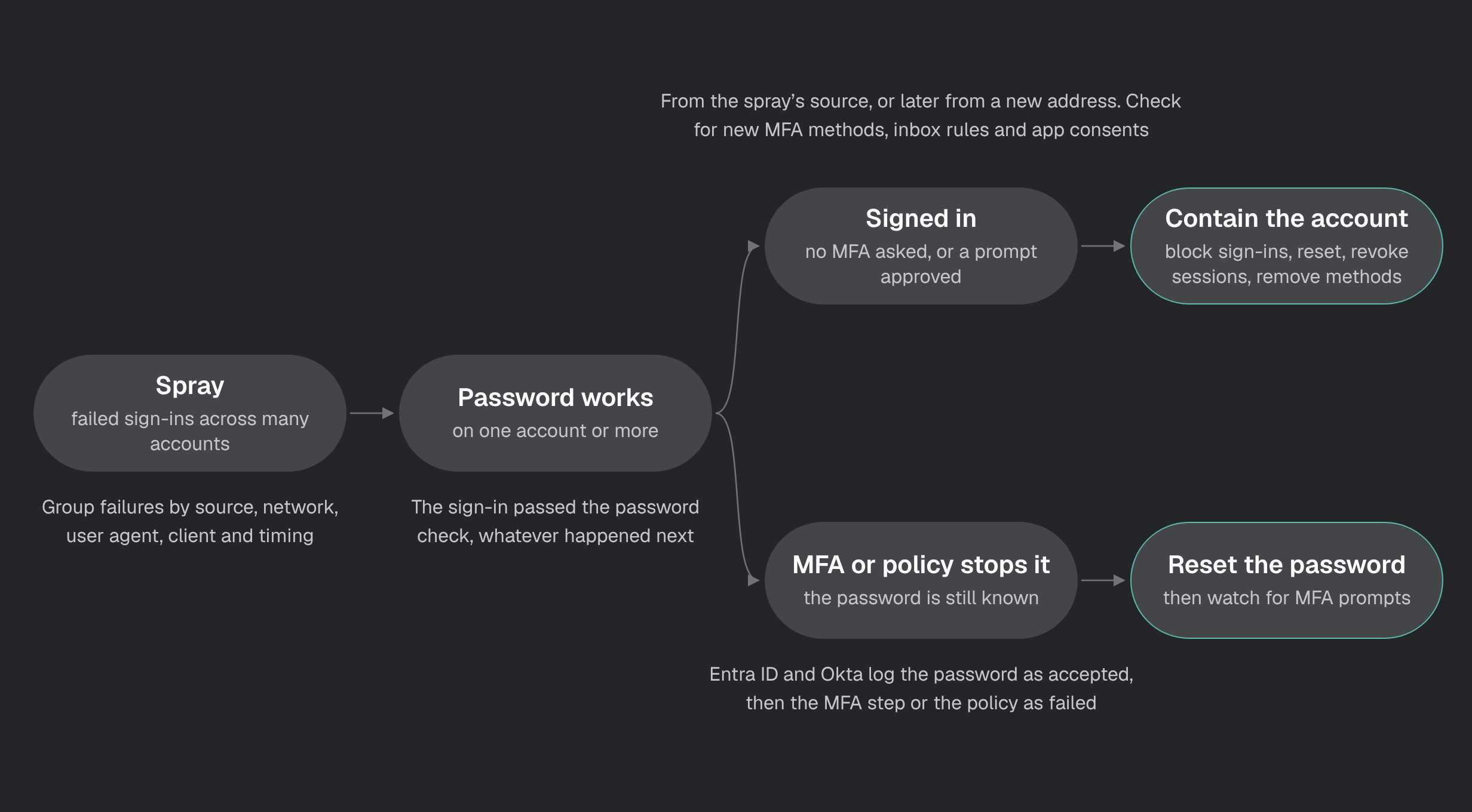
- A password that worked. Pull every successful sign-in from a spraying source, and every sign-in where the password was right but MFA or a policy stopped it. Treat those passwords as stolen.
- Later sign-ins. Stolen passwords can be handed to another group to use, so check each account's later sign-ins for a new place, device or app. One may also set off an impossible travel alert.
- MFA activity. Look for prompts the user didn't start, as in MFA fatigue attacks, and for MFA methods added from an unfamiliar place. On an account with no MFA set up, the attacker may be able to register their own.
- What the account did next. Look for new inbox rules, mail forwarding, new app consents and unusual file or mail access. Our guide to investigating business email compromise covers the mailbox side.
The diagram below follows a spray to the two outcomes that need action.
What looks like a password spray but isn't?
Several everyday problems cause bursts of failed sign-ins. Most of them differ from a spray in source, account count or timing:
- Stale passwords. A service account, scheduled task, app or phone still using an old password fails over and over against one account, or a few, from the same known machines.
- Shared addresses. An office network, VPN or web gateway sends many users' everyday failures from one address. Real users there usually get in within minutes.
- Scanners and tests. Some vulnerability scanners try weak passwords across accounts, and a red team spray is a real spray. Both usually come from known machines at agreed times.
- Sign-in changes. A broken app connection or a single sign-on change can make many users fail at once, on one app or one domain, starting when the change went in.
How should you respond to a password spray?
Respond at two levels, the accounts and the source, and weigh each control's cost against how your people sign in.
- Contain each account where a password worked. If the attacker signed in, block the account first where you can, since a method they added could still pass MFA or reset the password. Then reset the password, end its sessions and remove any MFA method, device or app password they added. Do the same where MFA stopped the sign-in, since the attacker still has those passwords.
- Check what outlasts the reset. Sessions already handed out can keep working until they expire, so watch the account afterward to confirm the attacker is out.
- Block or slow the source. A spray from changing addresses moves on, and a block on a shared address can lock out real users.
- Turn off old sign-in methods that can't do MFA. Find the printers and older apps that still need them first.
- Ban predictable passwords. A banned password list with your own terms added rejects common choices, such as a company name plus a digit or two.
- Hunt the source everywhere your users sign in. In the ARTEX campaign, Wiz saw the same tools spray Okta as well as Entra ID.
Detecting password spraying with Prophet AI
Prophet AI SOC Analyst investigates the identity alerts a spray sets off, whether they come from the detections your identity provider and security tools ship with or from custom detections your team writes to catch it. Each alert gets a full, evidence-backed investigation.
For what those detections miss, Prophet AI Threat Hunter has an expert-curated hunt for password spraying and account takeover against cloud identity providers. Custom Hunting Agents turn a team's own questions into standing hunts that run on their own on the team's schedule.
Suspicious leads from a hunt go to AI SOC Analyst the same way. When an investigation confirms a threat, AI Threat Hunter scopes when the attack started and how far it reached. Its block-user action also revokes the sessions and refresh tokens already issued to that user, either on its own or after approval, a choice our guide to automated remediation covers.
Prophet AI Detection Engineer then turns validated findings into backtested, reviewable detections in the team's own stack. To see these investigations and hunts run against your own sign-in logs, request a demo.
To detect password spraying, group failed sign-ins by what they share, such as the source address, network, user agent and timing, then count the accounts in each group. A group that touched many accounts with one or a few failures each is a likely spray. Next, look for the sign-in where a password worked from the same source, including sign-ins that MFA stopped after the password was accepted.
In Entra ID, search the sign-in logs. In Okta, search the System Log for failed sign-ins, lockouts and blocked requests. In Active Directory, search the security logs on every domain controller, which record failed password checks once failure auditing is turned on. In each one, group the failures by source and count how many accounts each source tried.
Account lockout counts failures per account, and a spray usually tries only one or a few passwords on each account, so it stays under the limit. Active Directory doesn't lock accounts out at all until an admin sets a threshold. Lower thresholds stop more guesses, but they lock out more real users, and attackers can use them to lock people out on purpose.
A misconfigured service account or app fails many times against one account, or a few, from the same known machines, usually with the same old password. A password spray fails a few times against many accounts, often from unfamiliar addresses or with one shared user agent. So compare the attempts per account and the source first.
If the attacker signed in, block the account's sign-ins where you can, then reset the password, end its sessions and remove any MFA method or device the attacker added. Do the same for accounts where MFA stopped the sign-in, since the attacker still has those passwords. Then check what the account did next and keep watching it for new activity.
Password spraying tries a few common passwords against many accounts. Brute force against one account tries many passwords on that account, so it tends to trip lockout. Credential stuffing replays real username and password pairs stolen from other sites, so each attempt is more likely to work. Each one leaves a different trail in the logs, so each needs its own detection.

Insights
Definitive Guide to Detection Engineering
Where detection engineering falls short, how to close those gaps, and what it looks like in an AI-enabled SOC.


As Principal Product Manager at Prophet Security, Augusto applies his hands-on experience and critical thinking to help push forward the new capabilities of Prophet AI SOC platform